A chart is just a URL.
Put one in an img tag, an email, a Google Sheets cell, a Slack message or a README, and a PNG comes back. No SDK, nothing to store.

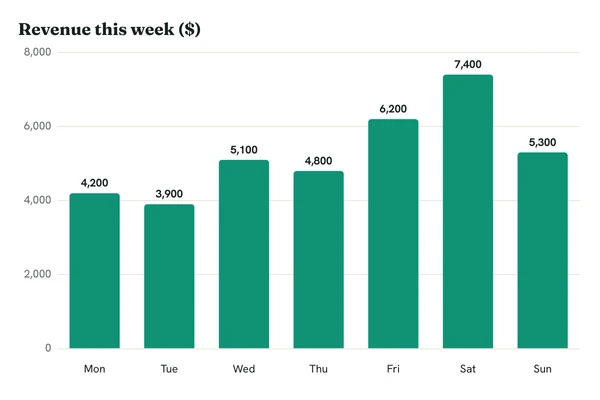
Try it yourself.
Change a value and the chart updates. The first request renders the chart; every request after that comes from cache and is free.

https://c.renderchart.com/?key=rc_pub_live_7Hq2mX9pLk4vN8sT1wEa
One URL, wherever an image goes.
Pick a place to see the line you'd paste. This is the chart from the form above.
<img src="https://c.renderchart.com/?key=rc_pub_live_7Hq2mX9pLk4vN8sT1wEa&type=bar &x=Mon,Tue,Wed,Thu,Fri,Sat,Sun &y=4200,3900,5100,4800,6200,7400,5300 &title=Revenue%20this%20week%20(%24) &values=1 "
width="600" height="400" alt="Revenue this week"> What happens after you paste it.
You pay for unique renders. Opening the same chart again costs nothing.
Cached by default
The first request draws the chart. Every request after it is served from cache and is free.
Paid plans keep going
On a paid plan, signed charts and short URLs keep rendering past your allowance as extra renders, billed at your plan's rate. Cap them or turn them off any time.
Signed when it matters
Your key is safe to publish, and any plan can lock it to signed URLs. On a paid plan, signed URLs lose the watermark. Short URLs hide your key and data, and on Pro they stay live.
Unsigned, signed or short.
Every chart can be written three ways. Where the URL is made decides which: your code can sign, a spreadsheet formula can't.

Unsigned/?key=rc_pub_...&y=4,7,5 | Signed/?key=rc_pub_...&y=4,7,5&sig=... | Short/s/aB3dE5gH7k | |
|---|---|---|---|
| Use it when | A tool that can't run code writes the URL: a Google Sheets formula, email merge tags, a no-code automation | Your code writes the URL: a report job, a Slack bot, your server | You paste a finished chart in by hand: Notion, a wiki, slides, a README |
| Who can make one | Anyone with your public key | Whoever holds the secret key: your server, or Sign in the app | You, in the app or with the REST API |
| Watermark | Always, on every plan | On Free only | None |
| Past your allowance, paid plans | Stops, unless the key allows extra renders for unsigned URLs | Carries on as extra renders | Carries on as extra renders |
| Hides your key and data | No | No | Yes |
| Can someone change the data? | Yes, as a new chart on your allowance | No, the signature breaks | No, the data is stored with us |
| New data | A new URL | A new URL, signed again | Pro: same URL, new data. Starter: a new short URL |
| Plans | Every plan | Every plan | Starter and above |
Every kind is cached the same way: the first request for a chart is a render and every later one is free. Which URL to use where
Pay for renders, not views.
The allowance is monthly on either interval. Compare plans
Free
$0a month
50 renders a month
Charts carry a small watermark.
- Watermarked
- Signed URLs and signed-only keys
- PNG
- Rate-limited
Starter
$29a month
$290a year
5,000 renders a month
Billed monthly. Cancel any time.
Billed yearly. 2 months free. The allowance is still monthly.
- Then $5 per 1,000 extra renders
- No watermark on signed and short URLs
- Short URLs
- MCP server for AI assistants
- REST API
Pro
$79a month
$790a year
25,000 renders a month
Billed monthly. Cancel any time.
Billed yearly. 2 months free. The allowance is still monthly.
- Then $4 per 1,000 extra renders
- Everything in Starter
- Brand themes
- Live short URLs
- PDF output
- Custom domain, coming soon
Business
$199a month
$1,990a year
150,000 renders a month
Billed monthly. Cancel any time.
Billed yearly. 2 months free. The allowance is still monthly.
- Then $3 per 1,000 extra renders
- Everything in Pro
- 500 new renders a minute per key
- 100 API keys
Charts in AI replies.
An MCP server lets Claude, ChatGPT and Cursor write the chart URL for you, signed with your key, and hand back the image ready for a reply, a doc or an email. Included on every paid plan. Connect an assistant
Moving from another service.