DocsChart URLs
Chart URL specification
A RenderChart URL is a chart. Put it in an <img> tag, an email, a Google Sheets =IMAGE() cell, a Slack message, a README or an AI agent's reply and you get a PNG back. The first request renders the chart and every later request is served from cache.
This document is the contract for the chart endpoint, the dashboard builder, the REST API, the MCP tools and the docs. The Worker, the builder and the tests all implement exactly what is written here.
https://c.renderchart.com/?key=rc_pub_live_xxxxxxxxxxxxxxxxxxxx&type=bar&x=Mon,Tue,Wed&y=20,30,40&title=SignupsEndpoints
| Endpoint | Purpose |
|---|---|
GET / |
Render a chart from query parameters. key is required. |
GET /s/{id} |
Render a saved short chart. The key and the data are hidden. Requires Starter or above to create; on Pro the data can be updated and the same URL shows the new chart within about five minutes. |
Only GET and HEAD are accepted. Everything else returns the 400 image.
Parameters
Parameter names are case sensitive and always lower case. Values are decoded as application/x-www-form-urlencoded: %XX sequences are decoded as UTF-8 and + means a space. To put a literal + in a value, encode it as %2B.
| Parameter | Meaning |
|---|---|
key |
Your public key: rc_pub_live_ followed by 20 letters and digits in production, rc_pub_test_ locally. Required on /. Not used on /s/. |
type |
bar (default), hbar, line, area, pie, doughnut, radar, polar or scatter. |
x |
Category labels, separated by sep (default comma). For scatter these are the numeric x values shared by every series. |
y, or y1 to y10 |
Values for one series, or up to ten series. y is an alias of y1; when both are present y1 wins. An empty entry (10,,30) is a gap. |
n, or n1 to n10 |
Series names. n is an alias of n1. Default Series 1, Series 2 and so on. |
sep |
A single character used to split x, y* and c, for when labels contain commas. Example: sep=;. It cannot be a letter, a digit, ., -, +, % or &. Series names (n*) are single values and are never split, so they may contain commas. |
title, xlabel, ylabel |
Text, up to 200 characters each. xlabel titles the horizontal axis and ylabel the vertical one, whatever the chart type. |
w, h |
Width and height in CSS pixels, 50 to 2000. Default 600 x 400. The image is w x dpr by h x dpr pixels. |
dpr |
Device pixel ratio, an integer from 1 to 3. Default 2. |
bg |
Background colour as hex without # (3, 4, 6 or 8 digits) or transparent. Default white, or the theme's background when theme is set. |
c, or c1 to c10 |
Colours as hex without #. c is a list separated by sep: one colour per series for bar, line and similar types, and one per slice for pie, doughnut and polar. c1 to c10 set one series each and override c. Unset colours come from the theme palette. |
theme |
light (default), dark or brand. brand uses the account's brand theme on Pro and falls back to light on other plans. |
legend |
top, bottom, left, right or none. Default none for a single series and top for two or more. pie, doughnut and polar default to right because the legend carries the slice labels. |
stacked |
1 stacks the series (bar, hbar, line, area). |
values |
1 draws each value on the chart. |
smooth |
1 draws curved lines (line, area, radar, scatter with lines). |
min, max |
Bounds for the value axis. |
format |
png (default) or pdf (Pro). jpg is reserved and currently returns the 400 image. |
cfg |
Advanced mode: a base64url encoded Chart.js configuration. See below. |
exp |
Unix timestamp (seconds). Honoured only on signed URLs: after it passes the URL returns the 401 image. |
sig |
The signature. See Signing. |
Boolean parameters (stacked, values, smooth) are true for 1 or true and false for anything else.
An empty value (w=, theme=) means the parameter was not given and its default applies. An empty key is a missing key.
Numbers in x (scatter), y*, min and max are plain decimals such as 12, -3.5 or 1e3. Anything else is invalid.
Unknown parameters are ignored and never affect the image, the signature or the cache. Tracking parameters added by email tools (utm_source, fbclid and so on) therefore neither break charts nor cause new renders.
Limits
| Limit | Value |
|---|---|
| URL length | 8,000 characters |
| Series | 10 |
| Points per series | 500 |
| Labels and series names | 100 characters each |
| Title and axis labels | 200 characters each |
cfg |
8,192 bytes decoded |
| Width and height | 50 to 2000 each |
Requests over a limit return the 400 image.
Chart types
type |
Chart.js type | Notes |
|---|---|---|
bar |
bar |
Vertical bars. |
hbar |
bar with indexAxis: 'y' |
Horizontal bars. min and max apply to the x axis. |
line |
line |
Straight lines unless smooth=1. |
area |
line with fill: true |
The fill uses the series colour at 25% opacity. |
pie |
pie |
One series. x gives the slice labels. |
doughnut |
doughnut |
As pie, with a 55% cutout. |
radar |
radar |
x gives the axis labels. |
polar |
polarArea |
As pie. |
scatter |
scatter |
x gives numeric x values; points are (x[i], y[i]) for each series. smooth=1 joins the points with a curved line. |
stacked is ignored for pie, doughnut, polar, radar and scatter. Extra series on pie, doughnut and polar are ignored.
Advanced mode: cfg
cfg is a base64url encoded (RFC 4648 section 5, padding optional) JSON object with the shape of a Chart.js 4 configuration: { "type": "...", "data": { ... }, "options": { ... } }. When cfg is present, type, x, y*, n*, c*, title, xlabel, ylabel, legend, stacked, values, smooth, min, max and sep are ignored. w, h, dpr, bg, theme, format, key, exp and sig still apply.
The configuration is validated against an allow list before use:
typemust be one ofbar,line,pie,doughnut,radar,polarArea,scatterorbubble.- Values may only be objects, arrays, strings, numbers, booleans or null. There are no functions, so callbacks, custom tick formatters and scriptable options are not available. Keys starting with
__are removed. - Strings that contain
http:,https:,//,data:,javascript:orurl(are removed, so nothing in a chart can reach the network. options.pluginsmay only containlegend,title,subtitle,tooltip,valuesandbackground. Anything else, including the watermark, is removed.options.animationandoptions.responsiveare always forced off, andoptions.devicePixelRatiocomes fromdpr.- Up to 8,192 bytes decoded, 1,000 array elements in total, and 12 levels of nesting.
An invalid cfg returns the 400 image.
Themes
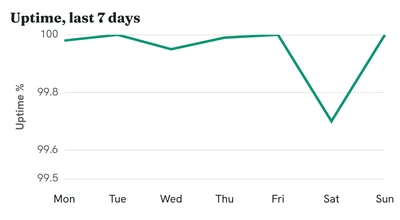
light draws dark text and grid lines on a white background. dark draws light text and grid lines on a near-black background. Both use the RenderChart default palette for series that have no colour set. brand (Pro) replaces the palette, background, text colour and font with the account's brand theme, and may load a Google Font. bg always overrides the theme background.
theme=light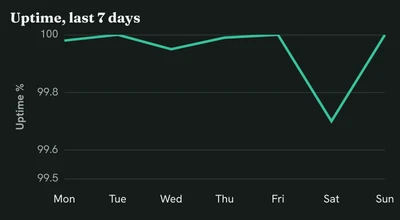
theme=darkWatermark
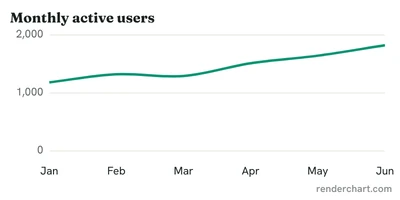
Unsigned URLs, and every URL on Free, unverified and admin-free accounts, carry a small semi-transparent "renderchart.com" mark in the bottom right corner, inside the image. Signed URLs on paid plans have no watermark. No parameter can remove it.
Responses
Successful responses on /:
200 OK
Content-Type: image/png            (or application/pdf)
Cache-Control: public, max-age=31536000, immutable
Access-Control-Allow-Origin: *
X-RC-Cache: edge | r2 | render
Successful responses on /s/{id} are the same except Cache-Control: public, max-age=300.
Errors return a static PNG at the same size for every request, with Cache-Control: no-store unless noted, so a broken URL is visible wherever the image is embedded:
| Status | Meaning | Notes |
|---|---|---|
| 400 | Invalid request | A parameter is missing, malformed, over a limit, or cfg failed validation. Also returned for format=jpg while it is reserved. |
| 401 | Bad or expired signature | sig is present but wrong, or exp has passed. |
| 402 | Free limit reached | The account is Free or unverified and has used its renders for the period. Cache-Control: public, max-age=300. |
| 403 | Unknown or revoked key | Also returned when key is missing or malformed. |
| 429 | Rate limited | Too many renders for this key or from this address in the last minute. Cached charts are never rate limited. |
| 503 | Renderer unavailable | html2img failed or timed out, or the local render budget is exhausted. |
Checks run in this order: request shape and parameters (400), key lookup (403), signature and expiry (401), then only when the chart is not already cached: account limit (402), rate limits (429) and rendering (503).
Only the first request for a given chart renders. A chart is "the same" when the canonical query (see Signing), the account's render epoch and the output flags (watermark, theme) match. Every later request is served from the edge cache or R2 and never counts against your allowance.


Rate limits
Rate limits apply to renders, not to cached responses.
| Scope | Limit |
|---|---|
| Per key, Free and unverified | 20 renders per minute |
| Per key, Starter and Pro | 300 renders per minute |
| Per key, Business | 1,000 renders per minute |
| Per client address | 600 renders per minute |
Examples
# Bar chart with a title
/?key=KEY&type=bar&x=Mon,Tue,Wed,Thu,Fri&y=12,19,3,5,2&title=Signups%20this%20week

# Two stacked series with names and colours
/?key=KEY&type=bar&x=Q1,Q2,Q3,Q4&y1=10,20,30,40&y2=5,15,25,35&n1=Online&n2=Retail&c1=2563eb&c2=f59e0b&stacked=1

# Smooth line with axis labels and a fixed range
/?key=KEY&type=line&x=Jan,Feb,Mar,Apr&y=99.9,99.95,99.7,100&smooth=1&min=99&max=100&ylabel=Uptime%20%25

# Doughnut with slice colours and values
/?key=KEY&type=doughnut&x=Yes,No,Maybe&y=62,28,10&c=16a34a,dc2626,9ca3af&values=1

# Labels containing commas
/?key=KEY&type=hbar&sep=;&x=Smith, John;Doe, Jane&y=3;5

# Dark theme, retina, PDF (Pro), signed
/?key=KEY&type=area&x=1,2,3,4,5&y=1,4,9,16,25&theme=dark&dpr=3&format=pdf&sig=SIGNATURE
Replace KEY with your public key. The dashboard builder writes these URLs for you.
Next: Signing