Use it in
Charts in Notion.
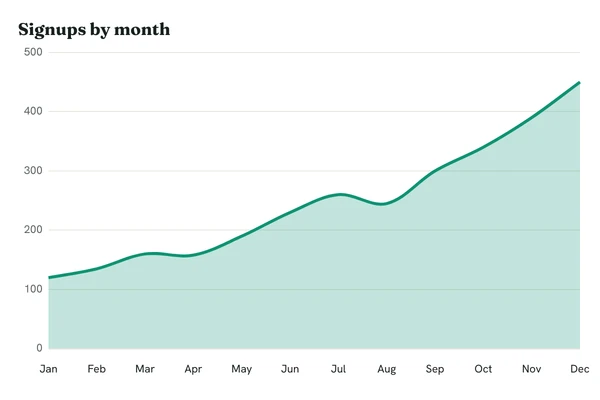
Paste a chart URL as an image embed and the page shows the PNG. With a live short URL, the page keeps up with the data.
Growth reviewTeam space
Growth review
Signups by month, from the live short URL. It updates when the data does.
Set it up.

Make the chart
Write the URL, or make a short URL in the app.
Embed it
Type /image, choose Embed link, and paste the URL.
Keep it current
On Pro, update the short URL's data and the page shows the new chart.
 Worth knowing.
- Short URLs
- Pages get shared. A short URL keeps your key out of them.
- Refresh
- Live short URLs are cached for five minutes, so new data shows within about that.