BlogPDFs
Add a chart to a PDF made with dompdf
Dompdf never runs JavaScript, so a Chart.js canvas comes out blank. Give it the chart as an image URL and the chart lands in the PDF, sharp enough to print.
Dompdf turns HTML and CSS into a PDF without running a line of JavaScript, so the Chart.js canvas in a statement template has nothing to draw it. We tried one with dompdf 3.1.6 and the canvas did not even leave a gap. Old forum answers suggest turning on isJavascriptEnabled, but that option is on by default, and the JavaScript it means is code embedded in the file for the PDF viewer to run.
Dompdf does draw images. A RenderChart URL returns a chart as a PNG, so the chart goes into the PDF as an ordinary <img> tag, built from the same numbers as the rest of the page and fetched while the PDF is made.
Build the chart URL in PHP
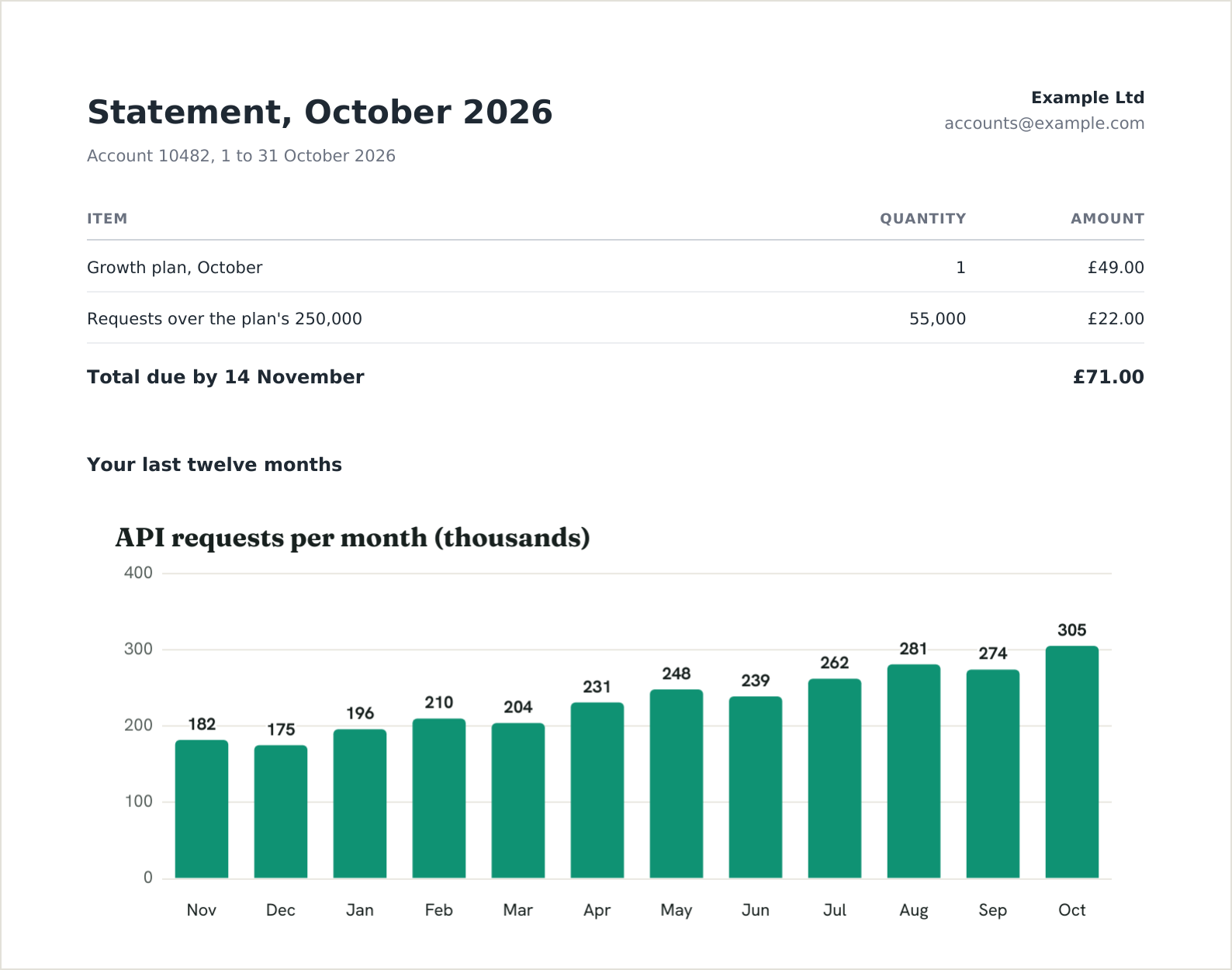
The statement shows a bar for each of the last twelve months, with the values printed on the bars because nobody can hover over a PDF. http_build_query encodes the title and the commas. renderchart_sign() is the function from the PHP section of the signing guide, saved as renderchart.php.
<?php

require __DIR__ . '/vendor/autoload.php';
require __DIR__ . '/renderchart.php'; // renderchart_sign(), from the signing guide

use Dompdf\Dompdf;
use Dompdf\Options;

// Twelve months of usage for one account, oldest first
$months = ['Nov', 'Dec', 'Jan', 'Feb', 'Mar', 'Apr', 'May', 'Jun', 'Jul', 'Aug', 'Sep', 'Oct'];
$requests = [182, 175, 196, 210, 204, 231, 248, 239, 262, 281, 274, 305]; // thousands

$chartUrl = renderchart_sign('https://c.renderchart.com/?' . http_build_query([
    'key' => getenv('RENDERCHART_KEY'),
    'type' => 'bar',
    'x' => implode(',', $months),
    'y' => implode(',', $requests),
    'title' => 'API requests per month (thousands)',
    'values' => 1,
    'w' => 680,
    'h' => 300,
]), getenv('RENDERCHART_SECRET'));
RENDERCHART_KEY is your public key and RENDERCHART_SECRET its secret, both from the keys page in the app. Sign the URL. Your code builds it on your server, which is where the secret belongs, and a signed URL cannot be edited into a different chart by anyone who reads it. On a paid plan it also renders without the watermark. Which kind of URL to use where covers the places that cannot sign, such as a spreadsheet formula.
Let dompdf fetch the image
By default dompdf loads nothing over the network. Our first run left that setting alone, and the PDF came out with the alt text, “API requests per month”, printed where the chart should have been. Two options fix it. The second stops dompdf fetching from anywhere else:
$html = '<h1>Statement, October 2026</h1>
<img src="' . htmlspecialchars($chartUrl) . '" width="680" height="300" alt="API requests per month">';

$options = new Options();
$options->setIsRemoteEnabled(true);
$options->setAllowedRemoteHosts(['c.renderchart.com']);

$dompdf = new Dompdf($options);
$dompdf->loadHtml($html);
$dompdf->setPaper('A4');
$dompdf->render();

file_put_contents('statement.pdf', $dompdf->output());
setAllowedRemoteHosts arrived in dompdf 3.0. On 2.x the method does not exist, so remote loading is all or nothing. With the list in place, a logo we pointed at another host was refused with “Remote host is not in allowed list”, which is the behaviour you want once any of the HTML comes from your users.
htmlspecialchars writes each & in the URL as &, as HTML expects inside an attribute. Dompdf decodes it again before it asks for the image.
In Laravel, barryvdh/laravel-dompdf (3.1.2 when we checked) reads the same two settings from the options array in config/dompdf.php:
'enable_remote' => true,
'allowed_remote_hosts' => ['c.renderchart.com'],
Set the width and height on the img tag
RenderChart draws every chart at twice the size you ask for, so it stays sharp on high-density screens: dpr=2 is the default pixel ratio. For w=680&h=300 the PNG is 1,360 by 600 pixels.
Dompdf sizes an image from its pixels unless the tag says otherwise. When we left width and height off, it laid the chart across the page at its full 1,360 pixels, although A4 has room for only about 700 inside dompdf’s default 1.2 cm margins. The chart stopped at May.
With both attributes set, all 1,360 pixels sit in a 680 pixel box, which comes to 192 pixels per inch in the PDF and is plenty on a screen. For a statement that gets printed, add dpr=3: our chart came out at 288 pixels per inch, and the PDF grew from 46 KB to 72 KB.
When the PDF shows the alt text
Two different faults gave us exactly the same PDF: the alt text where the chart should be. The first was remote loading switched off. The second came after we switched it on, while we were still testing with an unsigned URL and a key that accepts signed URLs only (keys you create on a paid plan start that way). RenderChart answered with its 401 image, which reads “Missing or invalid signature”. Dompdf keeps an image only when the response is a 200, so it threw that one away and fell back to the alt text.
It does record why. Print the warnings after render():
global $_dompdf_warnings;
print_r($_dompdf_warnings);
The first fault shows up as “Remote file requested, but remote file download is disabled.” The second shows up only as “Image not found”, and for that one the chart URL itself has the answer. Open it in a browser to see the error image, or read the reason from its headers:
curl -sI "$CHART_URL" | grep -i x-rc-errorOurs said signature_required. A chart with h=3000, over the 2,000 pixel limit, says invalid_param:h. The URL specification lists every error image and the header that comes with it.
Or fetch the chart yourself
When remote loading has to stay off, or a statement without its chart must never reach a customer, fetch the PNG in your own code and hand dompdf a data URI. You choose the timeout and see the status, and dompdf never touches the network.
// Fetch the chart yourself, so a failure stops the job instead of shipping a PDF without it
$curl = curl_init($chartUrl);
curl_setopt_array($curl, [
    CURLOPT_RETURNTRANSFER => true,
    CURLOPT_TIMEOUT => 15,
    CURLOPT_HEADERFUNCTION => function ($curl, $header) use (&$error) {
        if (stripos($header, 'x-rc-error:') === 0) {
            $error = trim(substr($header, 11));
        }
        return strlen($header);
    },
]);
$png = curl_exec($curl);
$status = curl_getinfo($curl, CURLINFO_HTTP_CODE);

if ($status !== 200) {
    throw new RuntimeException("Chart failed with HTTP $status: " . ($error ?? curl_error($curl)));
}

$html = '<h1>Statement, October 2026</h1>
<img src="data:image/png;base64,' . base64_encode($png) . '" width="680" height="300" alt="API requests per month">';

$dompdf = new Dompdf(); // remote loading stays off
Render and save as before. With the signature left off, this version stopped with “Chart failed with HTTP 401: signature_required”, which ends the run before a statement without its chart can go out. Laravel’s HTTP client gives you the same status and header if you would sooner not touch curl.
What it costs
Each statement with its own twelve numbers is a new chart, and a new chart is one render the first time anything asks for it. After that the PNG comes from cache and costs nothing. A customer who downloads the same statement twice never adds a render, and neither does your app building it again next week. The same URL in the email that carries the PDF counts once too; the Monday revenue report tutorial puts a chart in an email body.
Run 1 is the slow one because that request drew the chart. A second chart, at dpr=3, took 3.6 seconds the first time and just over half a second after that. A job that builds a few thousand statements one after another spends most of its time waiting on those first requests, so if it runs too long, request the charts in parallel before building the PDFs and dompdf will get each one from cache. New renders are limited per key, to 20 a minute on Free and 300 on Starter and Pro.
The free plan has 50 renders a month, which is enough to build the template and try it on real data. Every chart on it carries a small renderchart.com watermark, even a signed one. Starter is $29 a month for 5,000 renders and draws signed charts without the watermark, so 2,000 statements a month fit with room to spare. Past the allowance, signed charts go on as extra renders at $5 per 1,000, which you can cap or turn off. Upgrading changes nothing in your code. Each chart is drawn once more the next time it is requested, which counts as a render, and comes back clean.
Your statement code already has the numbers. Create a free account and run the script against one real statement with your key and secret in the environment. It costs one of the 50 free renders, and the watermark in the corner shows where a clean chart will sit once you are on Starter.