BlogMoving
Move a Google Image Charts pie to RenderChart
cht, chd and chl map onto type, y and x. Here is the whole conversion, parameter by parameter, for a chart that stopped working when Google shut the service down.
The chart you had
Google Image Charts drew a chart from a URL, the same idea RenderChart is built on. A survey pie looked like this:
https://chart.googleapis.com/chart?cht=p&chs=600x400
  &chd=t:46,31,15,8
  &chl=Very+satisfied|Satisfied|Neutral|Unsatisfied
  &chtt=How+happy+are+you+with+support%3F
Every place that URL was pasted, an old report, a wiki page, a README, now shows a broken image.
Map it, parameter by parameter
| Google Image Charts | RenderChart | Notes |
|---|---|---|
cht=p |
type=pie |
pc becomes doughnut (its first ring), bvs and bvg become bar, lc becomes line. |
chd=t:46,31,15,8 |
y=46,31,15,8 |
Only the text encoding (t:) maps directly. Each | in chd starts a new series: y1, y2 and so on. |
chl=Very+satisfied|... |
x=Very%20satisfied,... |
Labels are separated by commas instead of |. |
chs=600x400 |
w=600&h=400 |
Up to 2000 each. 600 x 400 is the default, so you can leave it out. |
chtt=... |
title=... |
Up to 200 characters. |
The chart you have now
Put the parts together with your key in front:
Figure 1
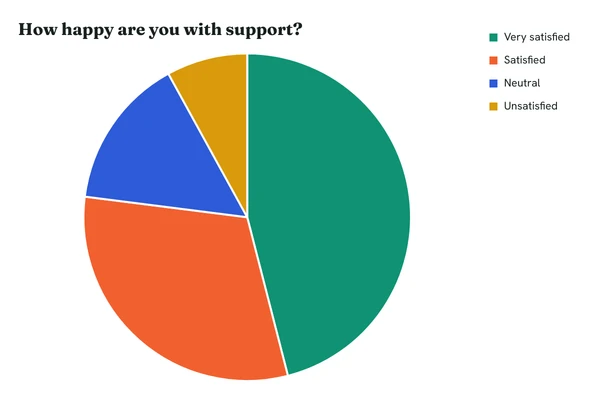
The same survey as a RenderChart pie. The legend carries the slice labels on the right.
https://c.renderchart.com/?key=rc_pub_live_7Hq2mX9pLk4vN8sT1wEa
Labels that contain commas need another separator: add sep=; and separate everything with semicolons instead.
Convert the rest automatically
If you have more than a handful, paste each old URL into the converter. It reads cht, chd, chl, chdl, chs, chtt, chco and chds and writes the RenderChart URL, with the chart beside it so you can check it before you replace anything.
What changes
The first request for each chart renders it, and every view after that comes from cache and is free. The old URL carried no key; the new one carries your public key, which can only draw charts. To keep it out of a public page, use a short URL on Starter and above.

Chart looks different?
Colours come from the RenderChart palette unless you set them. Google’s chco maps to c, hex colours without the #, one per slice on a pie. The converter turns Google’s | between slice colours into commas.